

Skip to content
View in the app

A better way to browse. Learn more.

APlusPhysics Community

A full-screen app on your home screen with push notifications, badges and more.

To install this app on iOS and iPadOS
  1. Tap the Share icon in Safari
  2. Scroll the menu and tap Add to Home Screen.
  3. Tap Add in the top-right corner.
To install this app on Android
  1. Tap the 3-dot menu (⋮) in the top-right corner of the browser.
  2. Tap Add to Home screen or Install app.
  3. Confirm by tapping Install.

Physics In Baseball

(0 reviews)

In baseball there is a lot of physics. With physics you can calculate the distance the ball has traveled after you have thrown it with the kinetic equations. You would need the time it took to get to a certain spot, the initial velocity, and the final velocity. With these key pieces of information i can figure out how far my 90 mph fast ball will go! One thing i want to learn is how fast you have to swing your bat and at what angle your bat has to be in order to get a home run. One thing you can use in physics is seeing how high you would need to jump over the wall the rob a home run from another player. This would be cool to calculate because i play outfield and that is my job! Without physics i would not be able to play baseball because every aspect of baseball has some sort of physic from hitting to watching the ball hit the bat. I am excited to see what else i can apply to baseball!
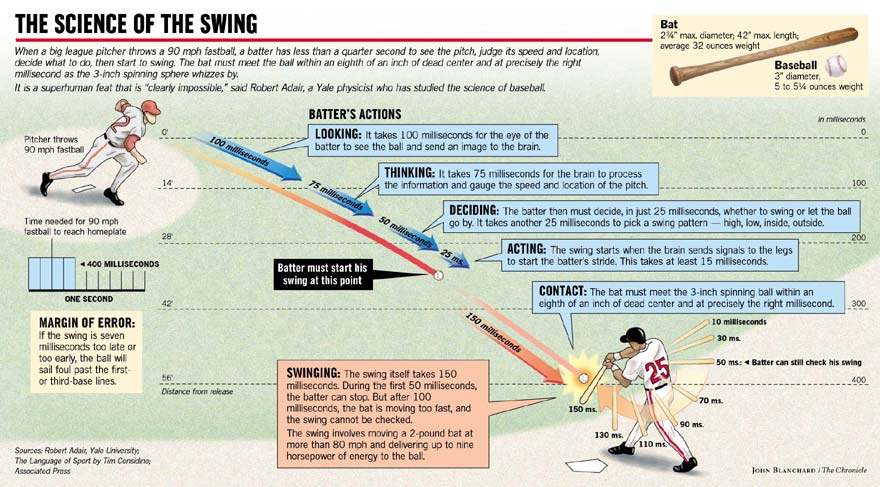
AdairSwing.jpg

2 Comments

Recommended Comments

Very nice.  I'm still recovering from the recent loss by my Pirates, but seeing physics in baseball helps make up for it!

Fysics

Members

Cool! Baseball is fun and I bet you guys win allot since you know all the fysics...I bet on the way to first base after you get a hit you take your time to figure out the velocity...just kidding but you do take your time

Guest
Add a comment...

Account

Navigation

Search

Search

Configure browser push notifications

Chrome (Android)
  1. Tap the lock icon next to the address bar.
  2. Tap Permissions → Notifications.
  3. Adjust your preference.
Chrome (Desktop)
  1. Click the padlock icon in the address bar.
  2. Select Site settings.
  3. Find Notifications and adjust your preference.