

Will Physics Pay Off?

Entry posted by crazycrochet20
601 views
So, most of us in Physics C have reached a point where we start to think about college and how this class is going to help us in the future. From what I have heard, most of us in this class plan on going into something that relates to physics in some way whether it be engineering or just a normal physics major. In the classroom, there is a poster that has the 10-Best Paying Majors on it which sparked my idea for this post.
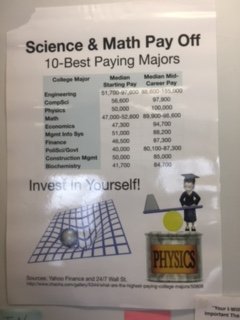
In other math and science classrooms you can see posters like this one that try to keep people involved in these classes. STEM classes have components that are in the top paying jobs overall. More recent information says that the order of top paying jobs include a lot of engineering which includes a lot of physics.
10. Geological and geophysical engineering
9. Computer engineering
8. Mechanical engineering
7. Aerospace engineering
6. Electrical engineering
5. Chemical engineering
4. Mining and mineral engineering
3. Metallurgical engineering
2. Pharmaceutical sciences and administration
1. Petroleum engineering
As I think about how hard this class has become, I realize that it will somehow help me in the future even if it just for the challenge of it.
Until next time,
RK
0 Comments
Recommended Comments
There are no comments to display.