

Traffic Light Detection

Entry posted by krdavis18
2,164 views
When you pull up to the intersection to turn onto my street, the traffic light is able to detect that my car has pulled up. Have you ever wondered how this is possible? I thought I'd explore more into this capability. The most common method is the use of an inductive loop which is a simple coil of wire within the surface of the road. https://auto.howstuffworks.com/car-driving-safety/safety-regulatory-devices/question234.htm This website gives a great example of how this process works.
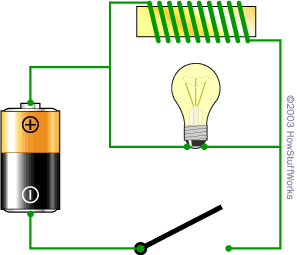
With this image as a reference, they write the following: "So... Let's say you take a coil of wire perhaps 5 feet in diameter, containing five or six loops of wire. You cut some grooves in a road and place the coil in the grooves. You attach an inductance meter to the coil and see what the inductance of the coil is. Now you park a car over the coil and check the inductance again. The inductance will be much larger because of the large steel object positioned in the loop's magnetic field. The car parked over the coil is acting like the core of the inductor, and its presence changes the inductance of the coil."
For more information you can click on the link above. It's pretty cool to finally understand this process!
0 Comments
Recommended Comments
There are no comments to display.