

Fork trick

Entry posted by goalkeeper0
3,701 views
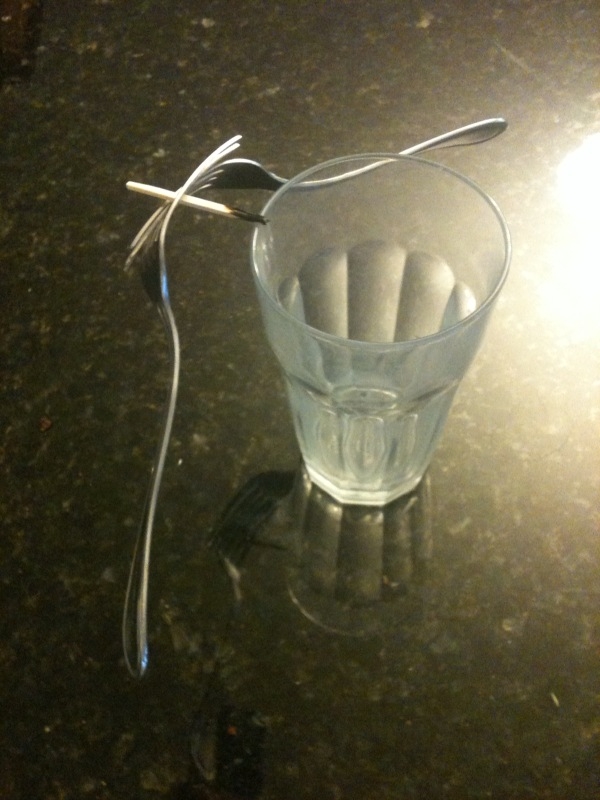
While I was dutifully studying physics today, because we are in our independent unit, I remembered the experiment Mr. Powlin did last year with the forks and toothpick. This experiment shows the concept of center of mass quite nicely. First of all, center of mass is the point on a system that moves as if all the mass of the system were concentrated at that point, and all external forces acted only on that point. In the magical experiment Mr. Powlin did last year, he shoved two forks together, so that they were connected between the tines. Then, a toothpick was wiggled between the forks. The toothpick was then balanced on a drinking glass, and the forks seemed to hover. The end of the toothpick between the rim of the glass, and the center of the glass, was burned. And, the toothpick ended up just barely balancing on the rim of the glass. Meanwhile, the forks were still attached to the toothpick. Why don't the forks fall? The center of mass of the toothpick and fork system is right below where the toothpick rests on the rim. Therefore, the system is in equilibrium. So, in the end, physics can explain this magical trick.
0 Comments
Recommended Comments
There are no comments to display.