

Skip to content
View in the app

A better way to browse. Learn more.

APlusPhysics Community

A full-screen app on your home screen with push notifications, badges and more.

To install this app on iOS and iPadOS
  1. Tap the Share icon in Safari
  2. Scroll the menu and tap Add to Home Screen.
  3. Tap Add in the top-right corner.
To install this app on Android
  1. Tap the 3-dot menu (⋮) in the top-right corner of the browser.
  2. Tap Add to Home screen or Install app.
  3. Confirm by tapping Install.

Dying

(0 reviews)

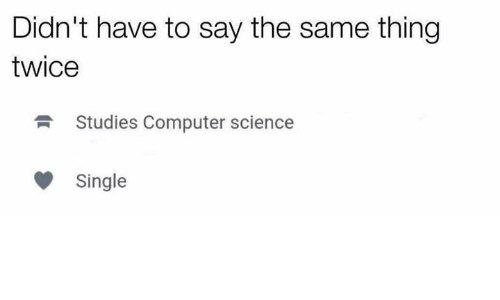
I was scrolling through Instagram and found this hilarious meme of someone's Tinder profile. It reminded me of earlier this week when Mr. Fullerton said that if a girl had the quadratic formula tattooed on her forehead, she wouldn't get a date. I guess nerds don't need love. Anyways, I entitled this blog "Dying" because, first of all, that meme made me die of laughter and, second of all, the first AP Physics C test killed me. With reflection I realized that this year is going to be a lot harder than I even first anticipated. I am not the smartest student on Earth, but I have an ambition and unwavering optimism in everything I do. Seeing that I "failed" a test really killed my spirits, and I am hoping that this class will not be the death of me. But deep down I know I can do it. AND YOU CAN TOO. We've just got to keep up with the work and keep trying. I learned that if I get slapped in the face by physics problems, I need to slap them back twice as hard. 
meme.png

5 Comments

Recommended Comments

You can do it!  And as I recall, you didn't "fail" the test so much as receive a score you're not overly thrilled with.  Which happens to EVERYONE in here.  Keep doing what you're supposed to and it'll all work out.  :kfu:

HegelBot153

Members

(edited)

If you feel like you're on the low, take your time and don't go out of your mind. Your life is yours and the future isn't something that comes to you but you must seize it for yourself.

Edit: spelling and grammar errors

Edited by HegelBot153

crazycrochet20

Members

I feel the same way! We can do this!

Guest
Add a comment...

Account

Navigation

Search

Search

Configure browser push notifications

Chrome (Android)
  1. Tap the lock icon next to the address bar.
  2. Tap Permissions → Notifications.
  3. Adjust your preference.
Chrome (Desktop)
  1. Click the padlock icon in the address bar.
  2. Select Site settings.
  3. Find Notifications and adjust your preference.